Web Designing (HTML – 5) 11th Information Technology Practicals Skill Set 2 Solutions Maharashtra Board
Balbharati Maharashtra State Board Class 11 Information Technology Solutions Practicals Skill Set 2 Web Designing (HTML – 5) Textbook Exercise Questions and Answers.
Class 11 Information Technology Practicals Skill Set 2 Exercise Solutions
SOP 1: Write a program using HTML with the following specifications.
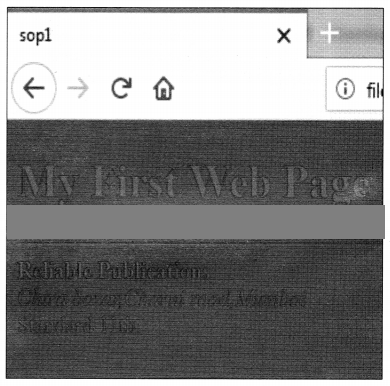
- The background colour should be green.
- The text colour should be red.
- The heading should be as large in size as ‘My First Web Page’.
- Display a horizontal line after the heading.
- Display your name in Bold, address in Italics, and standard as 11th.
Answer:
<!DOCTYPE html>
<html>
<head>
<title>sop1</title>
</head>
<body bgcolor=green text= red>
<h1> My First Web Page </h1>
<hr>
<b> Reliable Publications</b>
<br>
<i> Chira bazar,Charni road,Mumbai</i>
<br>
Standard 11th.
</body>
</html>

SOP 2: Create a web page with, following specifications.
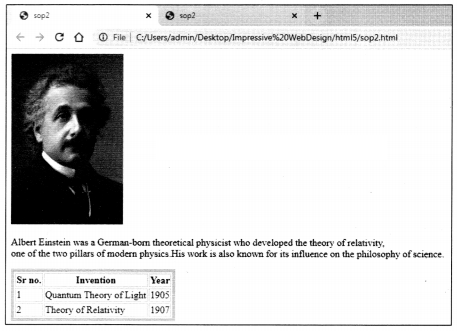
- Image of any scientist with an alternate text as his name.
- Create a paragraph related to the information of that scientist.
- Create a table of his/her inventions.
Answer:
<!DOCTYPE html>
<html>
<head>
<title>sop2</title>
</head>
<body>
<img src=”Albert Einstein.jpg” alt=”Albert Einstein”>
<br>
<p>
Albert Einstein was a German-born theoretical physicist who developed the theory of relativity,<br> one of the two pillars of modern physics.His work is also known for its influence on the philosophy of science.
</p>
<table border=5 bordercolor=pink>
<tr>
<th> Sr no.</th>
<th> Invention </th>
<th> Year</th>
</tr>
<tr>
<td>1</td>
<td>Quantum Theory of Light </td>
<td>1905</td>
</tr>
<tr>
<td>2</td>
<td>Theory of Relativity</td>
<td>1907</td>
</tr>
</table>
</body>
</html>
SOP 3: Create a webpage with the following specifications.
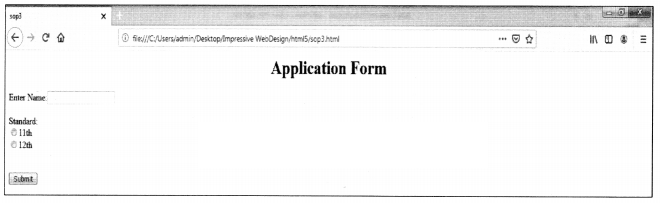
- Display heading ‘Application Form’ in the highest heading with center alignment.
- Accept name, standard 11th or 12th with only one selection choice.
- Submit the form.
Answer:
<! DOCTYPE html>
<html>
<head> <title> sop3</title>
</head>
<body>
<h1 align=center> Application Form </h1>
<form>
Enter Name:<input type=text name=t1>
<br><br>
Standard:<br>
<input type=”radio” name=r1>11th<br>
<input type=”radio” name=r1>12th<br>
<br><br>
<input type=”submit” value=”Submit”>
</form>
</body>
</html>
SOP 4: Write a program using HTML with the following specification.
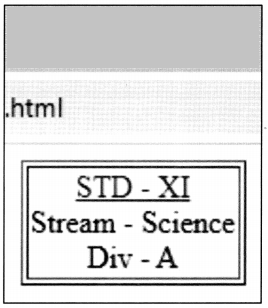
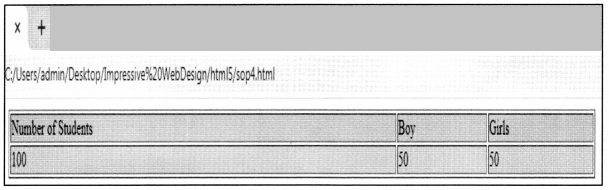
A webpage with details about a class with a total number of students-100, (Boys – 50), Girls – 50 in tabular form.
e.g.

Link this page to another page as follows.
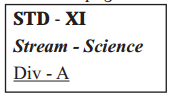
Demo.html
Answer:
<!DOCTYPE html>
<html>
<head>
<title>New Page 1</title>
</head>
<body>
<center>
<table border=”1” width=”69%” >
<tr bgcolor=pink>
<td>Number of Students</td>
<td>Boy</td>
<td>Girls</td>
</tr>
<tr bgcolor=”lightgreen”>
<td>100</td>
<td>50</td>
<td>50</td>
</tr>
</table>
</body>
</html>
Demo
<!DOCTYPE html>
<html>
<head>
<title>the heading</title>
</head>
<BODY>
<header>
<center>
<table border=”1” align=center>
<tr align=center>
<td><a href=”sop4.html”>STD – XI</a>
<br>Stream – Science<br>
Div – A<br></td>
</tr>
</table>
</body>
</html>