Pre-flight checklist and first hover — Drones for kids
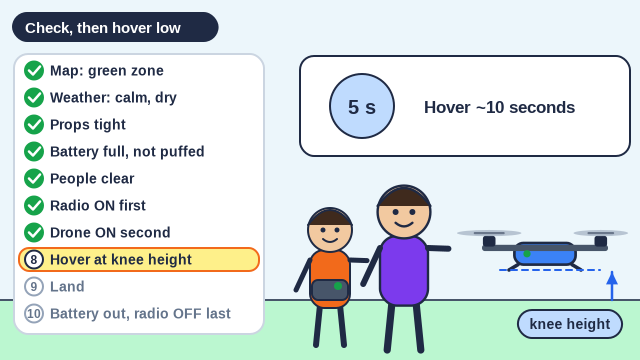
Real pilots never skip their checklist. Before take-off: check the airspace map and the weather, make sure the props are tight and the battery is full, clear people away, and switch the radio on FIRST so the drone always hears you. Your first flight is a low hover at about knee height for a few seconds — then land. After landing: unplug the battery, switch the radio off LAST, let the motors cool and write notes about the flight.
✓ You passed this lesson’s test.
🎬 See it move
Before every flight: is the airspace map green here? Is the weather calm and dry?
Read what the teacher says
Before every flight: is the airspace map green here? Is the weather calm and dry?
Props tight and not cracked. Battery full — and NOT puffed up.
Ask people and pets to move well away.
Radio ON first, then the drone — so the drone always hears you.
First flight: a low hover at knee height for about 10 seconds…
…then land and disarm.
After landing: battery out first — the radio goes off LAST.
🛠️ Build it at home: Pre-flight checklist and first hover
⏱️ 15 minutes before each flight📶 Easy · every pilot · with an adult👨👩👧 With a grown-up
🧩 Virtual build — tap the steps in the right order
Build it on screen first. Which step comes first?
⚠️ Read this with a grown-up first
Fly only with an adult, in a green zone, and keep the drone in sight.
Never fly over people, roads or animals.
If anything looks or sounds wrong — land and check.
🧺 You need
your drone and radio
a charged battery (checked by an adult)
an open, empty field in a green zone
a grown-up as spotter
📋 Steps — tick each one when it is done
🎉 You built it! Now take the lesson test below to earn the ✅ Checklist Captain badge.
🔬 Why it works
Most crashes happen because of something a checklist would have caught: a loose prop, a flat battery, wind or people too close.
🚀 Make it better
Laminate this checklist and keep it with your radio.
Practise 10 hovers, then 10 slow squares at knee height.
Write the battery level and flight time after every flight.
✏️ Practice
Work it out in your head or on paper, then tap your answer — or type it and press Check. Stuck? Press “Show me how”.
Right: 0 · Tried: 0
🏁 Lesson 22 test
20 questions. Check each answer, then go to the next one. Get 16 or more right to pass.
🏅 Sign in with Google to earn the
✅ Checklist Captain badge when you pass — and a certificate when you finish all 8 lessons of
Part 3 · Build a drone. You can still take the test without signing in.
👩🏫 Drones classes — live online, request a call back
Prefer a real teacher? TalentJR teachers take live online classes anywhere in India. Tell us what
you need and our team will call you with timings and fees.
💻Live online classesSmall groups or 1:1 with a teacher, from home, any city.
📞We call you backOur team asks what your child needs, then shares timings and fees.
🏠Home tutor?We are still building our list of home tutors — ask on the call if there is one near you.