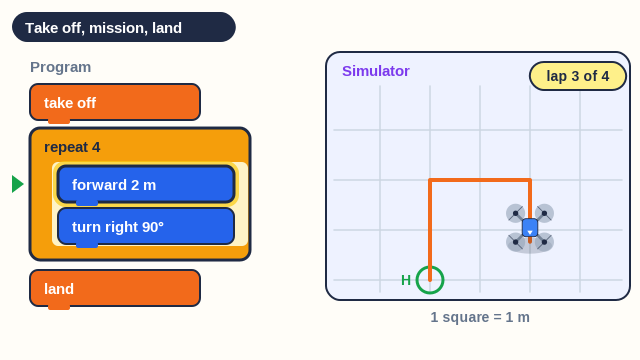
Drones can be programmed with blocks or code, just like a robot. Every program starts with take off and ends with land. In between come moves — forward, turn, climb — and loops: “repeat 4 { forward 2 m; turn right 90° }” flies a square. A real mission plan follows steps in order: plan the waypoints, check the home point, take off, fly the waypoints, take the photos, return home and land. Always test a new program in a simulator first — a bug there costs nothing.
✓ You passed this lesson’s test.
🎬 See it move
Every drone program starts with TAKE OFF.
Read what the teacher says
Every drone program starts with TAKE OFF.
Repeat 4 times: forward 2 m, then turn right 90°.
Watch the glowing block — that is the one running right now.
Every program ends with LAND.
Four sides of 2 m, a 90° turn after each: a square! 4 × 2 m = 8 m in all.
Test every new program in a simulator first — a bug there costs nothing.
🎮 Play with it: Mission planner
Pick the route: east, then north. Watch the drone fly the waypoints and then return home in a straight line.
Work it out in your head or on paper, then tap your answer — or type it and press Check. Stuck? Press “Show me how”.
Right: 0 · Tried: 0
🏁 Lesson 27 test
20 questions. Check each answer, then go to the next one. Get 16 or more right to pass.
🏅 Sign in with Google to earn the
💻 Drone Coder badge when you pass — and a certificate when you finish all 6 lessons of
Part 4 · Fly smart, program and use drones. You can still take the test without signing in.
👩🏫 Drones classes — live online, request a call back
Prefer a real teacher? TalentJR teachers take live online classes anywhere in India. Tell us what
you need and our team will call you with timings and fees.
💻Live online classesSmall groups or 1:1 with a teacher, from home, any city.
📞We call you backOur team asks what your child needs, then shares timings and fees.
🏠Home tutor?We are still building our list of home tutors — ask on the call if there is one near you.