Sensors that keep a drone steady — Drones for kids
A drone cannot balance by itself — its flight controller does it, using sensors. A gyroscope measures how fast it tilts; an accelerometer feels which way is down; a barometer measures air pressure to hold the same height; GPS knows its place on Earth and the way home; a compass knows north; a distance sensor sees walls and the ground. The flight controller senses, corrects the motor speeds and senses again, hundreds of times every second.
✓ You passed this lesson’s test.
🎬 See it move
The drone is hovering nicely…
Read what the teacher says
The drone is hovering nicely…
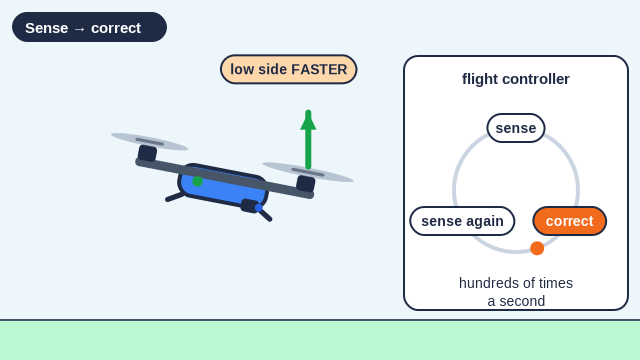
…whoosh! A gust of wind tilts it.
The gyro feels the tilt. The flight controller (the brain) decides what to do.
Correct: it speeds up the motors on the low side, and the drone levels again.
Sense again — all fine. This loop runs hundreds of times a second!
A drone has many senses: gyro, accelerometer and barometer…
…GPS, compass and a distance sensor. Sense → correct → sense again!
🎮 Play with it: Gust test
Send a gust of wind. With the gyro and flight controller ON, the drone senses the tilt and corrects it. Switch it OFF and see.
Work it out in your head or on paper, then tap your answer — or type it and press Check. Stuck? Press “Show me how”.
Right: 0 · Tried: 0
🏁 Lesson 15 test
20 questions. Check each answer, then go to the next one. Get 16 or more right to pass.
🏅 Sign in with Google to earn the
🧭 Sensor Navigator badge when you pass — and a certificate when you finish all 8 lessons of
Part 2 · How drones fly and move. You can still take the test without signing in.
👩🏫 Drones classes — live online, request a call back
Prefer a real teacher? TalentJR teachers take live online classes anywhere in India. Tell us what
you need and our team will call you with timings and fees.
💻Live online classesSmall groups or 1:1 with a teacher, from home, any city.
📞We call you backOur team asks what your child needs, then shares timings and fees.
🏠Home tutor?We are still building our list of home tutors — ask on the call if there is one near you.