How to make an 8-bit Brick Breaker game — retro game maker
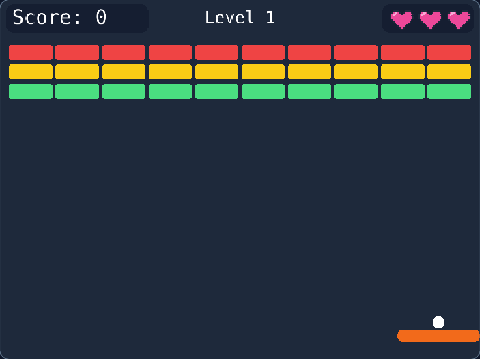
Bounce the ball, break every brick, clear the levels — an 8-bit bat-and-ball game whose levels you paint yourself. Play it first, then open it in the Retro 8-bit Studio and change it until it is your own game.
🎮 Controls: ← → move · Z launch the ball · press Z on the title screen to start
The numbers that make the game
At the top of the 8-bit (TIC-80) code are the settings — change one, run the game, and feel the difference.
This is how game designers balance a game.
var PADDLE_SPEED = 3
How fast the paddle moves
var PADDLE_WIDTH = 32
How wide the paddle is
var BALL_SPEED = 2
How fast the ball flies
var LIVES = 3
Balls before GAME OVER
var BG = 0
The background colour (0 to 15)
var SOUND = true
False = a quiet game (F4 changes the sounds)
var MUSIC = true
False = no title tune (F5 changes the music)
7 ways to change the brick breaker game
Try them in order. The studio ticks each one off when your change works.
F1 Code: a wider paddle — change var PADDLE_WIDTH = 32 to 48, then Ctrl+R to play.
F1 Code: a different ball — var BALL_SPEED = 2 → 3 (faster) or 1.5 (slower).
F1 Code: more balls — var LIVES = 3 → 5.
F1 Code: your own title — change "BRICK BREAKER" to your game's name (CAPITALS look best).
F3 Map: paint your own level — add more bricks (pick a brick tile, click in the map).
F2 Sprites: paint your own ball (sprite 256).
F4 Sounds: make your own brick sound — pick sound 3, draw new volume or pitch bars.
How it works on TalentJR
Play the gameFind out what feels too easy or too hard — that is what you will change.
Open it in the studioRetro 8-bit Studio runs a real 8-bit computer (TIC-80): F1 code, F2 sprites, F3 map, F4 sounds.
Change one thing at a timeA number first, then a new rule, then your own art and title.
Save and shareSign in to keep your game, then share a talentjr.in/play/… link on WhatsApp — friends can play it and make their own version.