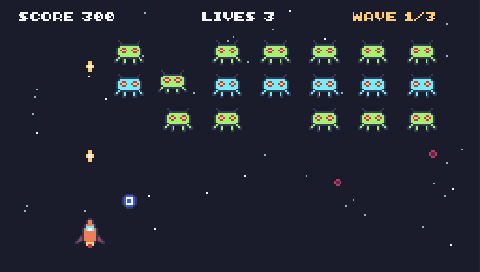
🎮 Controls: ← → to fly · SPACE to fire
The numbers that make the game
At the top of the code are the settings — change one, run the game, and feel the difference.
This is how game designers balance a game.
let shipSpeed = 320 | |
let laserSpeed = 600 | |
let alienSpeed = 120 | |
let alienEvery = 1.2 | A new alien every … seconds |
let alienPoints = 10 | |
let alienShootsEvery = 2 | An alien fires at you every … seconds |
let startLives = 3 | |
8 ways to change the space shooter game
Try them in order. The studio ticks each one off when your change works — and shows a hint if it does not.
-
Make the ship faster.यान को तेज़ करें।
-
Make the lasers faster.लेज़र को तेज़ करें।
-
More aliens: make them come more often.ज़्यादा aliens: उन्हें जल्दी-जल्दी लाएँ।
-
Harder: make the aliens faster.मुश्किल: aliens को तेज़ करें।
-
Each alien is worth more points.हर alien के अंक बढ़ाएँ।
-
Win at 100 points: after score.add(...), check the score.100 अंक पर जीत: score.add(...) के बाद स्कोर जाँचें।
if (score.value >= 100) {
    tj.victory("You saved the planet!")
}
-
Add a timer.एक timer जोड़ें।
tj.timer(60, () => tj.victory("You survived!"))
-
Easier: aliens shoot less often.आसान: aliens कम गोली चलाएँ।
The Space Shooter code (JavaScript)
53 lines of real JavaScript, made with TalentJR Game Studio's game library. Lines that start with // explain what the next part does.
Show the whole game code
// 🚀 Space Shooter — TalentJR Game Studio
// ✏️ Change these numbers, then press ▶ Run!
let shipSpeed = 320
let laserSpeed = 600
let alienSpeed = 120
let alienEvery = 1.2      // a new alien every … seconds
let alienPoints = 10
let alienShootsEvery = 2  // an alien fires at you every … seconds
let startLives = 3

tj.setup({ background: "space" })
tj.touchControls("shooter")

const ship = tj.player({ sprite: "rocket", x: 296, y: 410, speed: shipSpeed, mode: "leftright" })
const score = tj.score()
const lives = tj.lives(startLives)

// Fire with SPACE (or the A button)
tj.onAction("fire", () => {
    tj.shoot(ship, { speed: laserSpeed })
})

// Aliens come down from the top
loop(alienEvery, () => {
    tj.spawn("alien", { x: rand(0, width() - 48), y: -48, dir: "down", speed: alienSpeed, tag: "alien" })
})

// A laser hits an alien
onCollide("laser", "alien", (laser, alien) => {
    destroy(laser)
    destroy(alien)
    addKaboom(alien.pos)
    score.add(alienPoints)
})

// An alien hits the ship
ship.onCollide("alien", (alien) => {
    destroy(alien)
    lives.lose()
})

// Aliens shoot back!
loop(alienShootsEvery, () => {
    const aliens = get("alien")
    if (aliens.length > 0) {
        tj.shoot(choose(aliens), { dir: "down", speed: 300, colour: [248, 113, 113], tag: "alienLaser" })
    }
})
ship.onCollide("alienLaser", (laser) => {
    destroy(laser)
    lives.lose()
})
How it works on TalentJR
- Play the gameFind out what feels too easy or too hard — that is what you will change.
- Open it in the studioThe code is on the left, the game on the right. Press ▶ Run after every change.
- Change one thing at a timeA number first, then a new rule, then your own art and title.
- Save and shareSign in to keep your game, then share a talentjr.in/play/… link on WhatsApp — friends can play it and make their own version.